ArtCraft’s artcraft-v0.41.0 release on 2026-09-26 closed out two months of work. The repo is 1.3 MB of README, 75 GitHub releases, a Rust + Tauri 2.10 desktop app, a TypeScript/React/Nx frontend, and a 62-model catalog that spans images, video, music, 3D meshes, and Gaussian-splat worlds. Star count sits around 8K — small by star-history standards, but the architecture underneath is the part worth writing about.
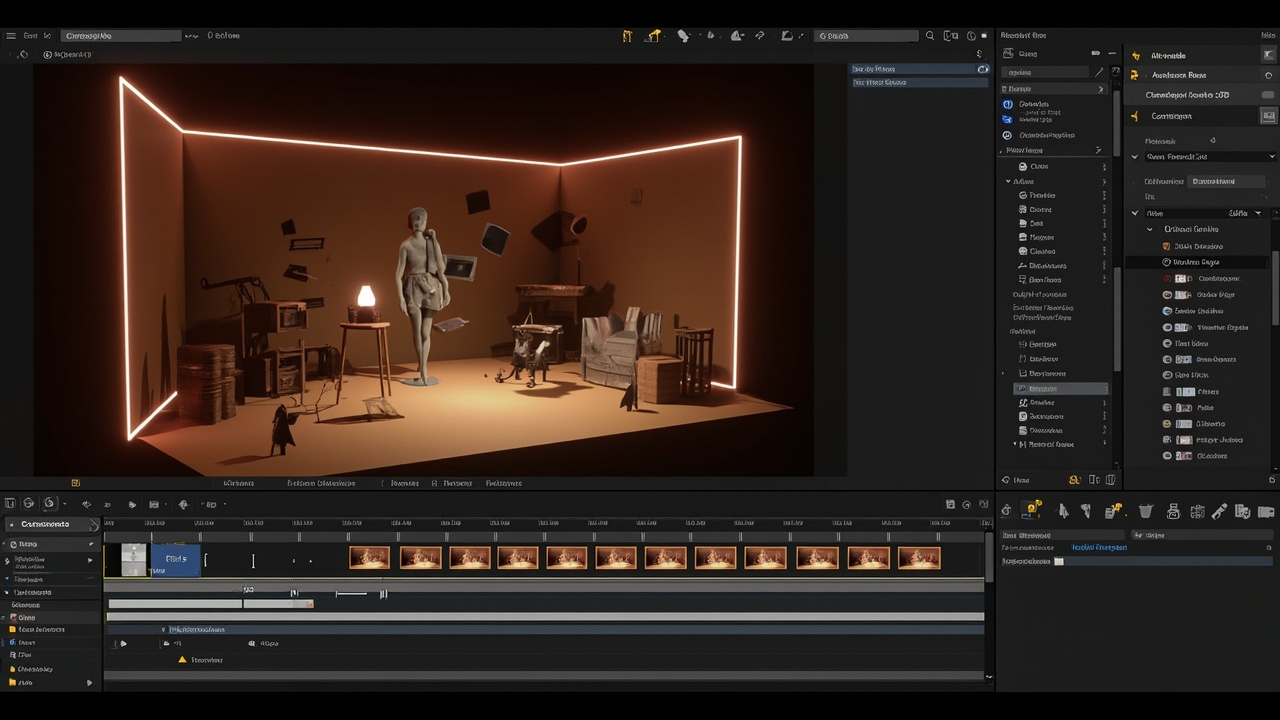
Most “AI image tools” in 2026 are still three things stapled together: a prompt box, a generate button, and a gallery. ArtCraft’s bet is that this surface is wrong. The team calls it a tangible computing surface — a 3D scene canvas where you can place a virtual actor in a virtual room, pose a mannequin, kitbash props from a 3D asset library, point a camera, and only then hit generate. The model is the last step, not the first.
The 62-model catalog is the easy part
The catalog lives in artcraft-services/crates/service/web/storyteller_web/src/configs/omni_gen/. That path is the source of truth — the README’s “62 models” count comes from a hand-maintained set of Rust source files (image_models.rs, video_models/, audio_models.rs, mesh_models.rs, splat_models.rs) that enumerate the available models and which GenerationProvider they belong to. The README is generated from those, not the other way around.
The split by modality:
- Images (16): Nano Banana, Nano Banana 2, Nano Banana Pro, GPT Image 1.5/2/2.5 Flare/2.5 Sunburst, FLUX.1 [dev]/[schnell]/1.1 [pro]/1.1 [pro] ultra, Seedream 4/4.5/5 Lite/5.0 Pro/5.0 Pro Ultra
- Video (25): Seedance 1.0 Lite/1.5 Pro/2.0, Kling 1.6 Pro/2.1 Pro/2.1 Master/2.5 Turbo Pro/2.6 Pro/3.0 Pro/3.0 Standard, Veo 2/3/3 Fast/3.1/3.1 Fast/3.1 Lite, Sora 2/2 Pro, Vidu Q3/Q3 Turbo, MiniMax H3/H3 Turbo/H3 Ultra, Flux 3/3 Draft
- Music and sound (5): Suno Music/Remix/Sounds/Sample, Seed Audio 1.0
- 3D meshes (11): Hunyuan 3D 2.0/2.1/3/3 Sketch/3.1 Pro/3.1 Rapid/3.1 Part/3.1 Smart Topology, Tripo3D H3.1, Meshy 6, Rodin 2.5 Fast
- Worlds and Gaussian splats (5): Marble 1.0/1.0 Draft/1.1/1.1 Plus, TripoSplat
The provider integrations beyond ArtCraft’s own hosted models are: Grok (Imagine and Video), Midjourney, Sora 1/2, GPT Image 1, and World Labs Marble. The roadmap lists Kling, Google, Runway, and Luma as next.
Notice the asymmetry. The model count is high because provider integration is the bottleneck, not model selection. Every model in the catalog is one of two kinds: either it’s an ArtCraft-hosted variant (the team runs their own inference) or it’s a thin proxy to a third-party API. There is no “we trained a model” claim anywhere. The product surface is the IDE, not the weights.
What “tangible” actually means in the UI
The README breaks the editor into two feature tables: “Show, Don’t Tell” (the composition tools) and “Quick and Easy Prompting” (the prompt-to-result path). The composition side is the meat.
Image to Location lets you drop a character into a virtual environment and plan multiple shots in the same room. This is not “inpainting a background” — it’s a 3D scene graph where the camera, the actor, and the lighting are first-class nodes. When you prompt the final shot, the model gets the rendered scene as a reference image, not a free-text description of the layout.
3D Image Compositing layers backdrops, foregrounds, and props in 3D with depth. The 2D variant does the same with image layers + background removal. The point is composability — a kitbashed scene where one element was generated with Hunyuan 3D, another with FLUX, and a third was photographed.
Image to 3D Mesh turns an image into a 3D object you can position, rotate, and frame. Character Posing then puts a mannequin in the scene that you can pose before generating. Character Identity Transfer uses a posed mannequin to guide where a different character appears in the final shot — so you can choreograph a fight scene with mannequins, then transfer the choreography onto the actors.
Scene Blocking with Kitbashing combines 3D asset kits for camera angles, object placement, and depth. Mixed Asset Crafting pulls image cutouts, worlds, and 3D meshes into a single scene. The conceptual move is to treat the canvas as a composition graph where the rendering backend can be any of the 62 models.
The prompting side is what you’d expect: Text to Image, Prompted Image Editing (Nano Banana Pro, GPT Image), Canvas Image Editing (drawing + masks + inpainting), Image to Video. But even the prompting path feeds into the same scene graph — the prompt fills a slot, it does not replace the composition.
The Omni API surface
The _docs/artcraft_omni_api.md file documents the programmatic surface. The interesting shape: the Omni API mirrors the in-app “Omni Gen” endpoints, but is API-key authenticated instead of session-cookie authenticated. The base URL is https://api.storyteller.ai (not api.getartcraft.com — the README explicitly says “This is not a typo”). The CDN URLs are cdn-2.fakeyou.com, which is the Storyteller/FakeYou origin story showing through.
API keys have the format artcraft_api_ followed by 40 Crockford-base32 characters, total 53 characters. Three auth header forms are accepted: Bearer artcra...xxxx, Key artcra...xxxx, or the raw artcraft_api_xxxx.... Bearer is recommended; sending cookies gets them ignored.
The video endpoint is POST /v1/omni_api/generate/video with this body shape:
{
  "model": "seedance_2p0",
  "prompt": "...",
  "duration_seconds": 6,
  "aspect_ratio": "wide_sixteen_by_nine",
  "idempotency_token": "uuid-v4",
  "start_frame_image_url": "https://...",
  "end_frame_image_url": "https://...",
  "reference_image_urls": ["https://..."],
  "reference_video_urls": ["https://..."],
  "reference_audio_urls": ["https://..."]
}
The idempotency_token is required. URL inputs and media-token inputs are mutually exclusive on the same field — sending both reference_image_urls and reference_image_media_tokens returns Either reference_image_media_tokens or reference_image_urls must be set, not both. Every URL must start with http:// or https:// (the error message names the bad URL). Redirects are followed up to 10 hops. File type is detected from the downloaded bytes, not from the URL extension.
The response is {success: true, inference_job_token: "jinf_..."} and you poll for results. The shape is standard async-generation — but the fields are revealing. There’s no seed, no guidance_scale, no num_inference_steps — provider-specific tuning parameters are abstracted away. The IDE controls the what, the API controls the when. Model-specific knobs (like Veo 3’s audio generation, or Sora 2’s duration_seconds ceiling) are gated by which model you pick.
The dev loop is itself a product surface
_docs/dev_setup.md is unusually careful for a desktop app. The launcher ./script/artcraft/unix_dev.sh starts Vite and Tauri together, with a “free-port search” that begins at 5193 and walks up until it finds a free port. The reasoning is in the doc: a hardcoded port breaks the moment two developers share a machine, and silently switching ports while Tauri holds an old URL creates a “frozen webview pointing at a dead Vite” failure mode.
The launcher binds Vite to 127.0.0.1 only. The native HTTP bridge normalizes loopback development origins so the auto-selected port does not break first-party API calls. This is a non-trivial problem: if Vite picks port 5195 because 5193 is taken, every fetch() to http://localhost:5193/... 404s. The bridge rewrites those to the actual port.
The testing story is node --test frontend/scripts/unix-dev.test.mjs — a Node test runner that uses real Vite listeners and HMR, with a test-owned fake Cargo process tree. The tests cover occupied ports, simultaneous launches, React edits, shutdown, Rust-process failure, and watcher arguments. The fake-Cargo trick is clever: instead of mocking the Rust process, the test launches a stub that exits 0 on a signal, so the launcher behavior under “Rust crashed” is exercised against a real subprocess, not a mock.
Rust reload is process restart, not hot-replace. SQLx metadata and SQLite migrations are watched. The doc explicitly notes: “Rust reload is a process restart, so it does not preserve unsaved in-memory app state.” If you’ve been staring at a half-composed scene when you save a Rust file, the scene goes away. The Tauri auto-rebuild pattern is unavoidable; the doc is just honest about the cost.
The license is the third hard thing
ArtCraft calls its license “fair source” and ships a LICENSE.md (WIP — the team flags it as not lawyer-vetted). The shape:
What you can do:
- Use it free
- Back up, copy, modify, compile, and use for private personal purposes
- Do anything you want with the media you create
What you can’t do:
- Sell the ArtCraft software commercially
- Use the code to develop a competing business (eg. selling AI image and video tools)
- Fork and remove ArtCraft community, donation links, or paid model services
- Use the ArtCraft name, logo, or mascot characters for your business
The “Our Promise” section is the load-bearing bit. Three commitments:
- All development and business plans will be communicated openly
- All engineering efforts will live in a single public monorepo
- They will not “rug pull” users — if the business shuts down, the tools continue to function
This is the same pattern as the §25d license-split concern, but turned up to 11. ArtCraft is not Apache source + non-commercial weights. It’s source-available code + no commercial resale + a non-revoking promise. The closest analog is the BSL (Business Source License) family, but ArtCraft’s wording is more permissive on personal use and stricter on competitive resale.
For an engineer evaluating the project, the practical read is: if you want to run it yourself, modify it, learn from the Rust/Tauri patterns inside, generate art with it, or even ship a fork to your art collective’s Discord — fine. If you want to wrap it in a paid SaaS and call it your own — no. The generated media is yours, which is the part most “AI image tool” licenses still get wrong.
What the 1.3 MB README actually shows about the team
Storytold is a real company. The roadmap lists “Build our content studio. Make lots of narrative shorts and at least one feature-length AI film by the year’s end. Theatrical distribution, but also lots of social media content. (We are creators, and we want to employ more creators!)” — they’re not just shipping an IDE, they’re using it to make a movie. The “Loftier Goals” section ends with “Build an Open OpenAI / Google / Anthropic. Open models, open platforms, open hardware. Why? Because the future could be bleak without it. How, you might ask? Get in touch if you’re curious.”
That last line is the one I’d quote if I were writing a recruitment post.
The Discord is 50K+ members, the YouTube channel has a two-minute demo, and the LinkedIn is “ArtCraft AI.” The release cadence (75 releases, v0.41.0 in the last two weeks, v0.37.0 the week before) is the kind of velocity that says the team is using the IDE to make a feature film and shipping the tooling alongside the production assets.
The bet, in one sentence
Most 2026 AI image tools compete on which model they wrap. ArtCraft competes on whether the prompt box is the right surface at all. The 62-model catalog is the easy part; the hard part is the 3D scene canvas that treats composition as a graph and the model as a renderer plugged into a slot.
What I’d want to know next
The Omni API is documented, but I haven’t found a public rate limit or pricing page. The license file is flagged WIP. The _database/sql/artcraft_migrations/ directory is in the monorepo but the SQLx query cache in .sqlx/ is also committed, which means the schema is reproducible from a fresh clone — a nice operational property for a Rust app that talks to SQLite.
The biggest open question for me: is the scene graph (mannequin → kitbash → camera → reference images → model invocation) itself a model? I.e., does the team intend to train a layout model that takes the scene graph and produces the final composite, or is the current pipeline still “you compose, the model renders, you iterate”? The “purpose-specific image models, eg. for relighting scenes and reposing characters and props” line in the roadmap suggests the former — that ArtCraft’s own model catalog (the “GenerationProvider::Artcraft” Rust enum) is going to grow to include models trained on the team’s own scene data. When that happens, the 62-model count drops in importance and the scene graph becomes the product.
That’s a much more interesting bet than the model count suggests.
Comments
Powered by GitHub Discussions via Giscus. Sign in with GitHub to leave a comment.